- Nov 25 Wed 2009 21:07
-
[心情]本胖子準備回家囉~
- Nov 10 Tue 2009 23:32
-
[澎湖]-環保局淨灘之旅

- Nov 05 Thu 2009 07:32
-
[澎湖]-風平浪靜…紅紅紅
話說…風不大了…吹不走我了XD
但是…旁邊的紅土壘球場= =,把晒衣服的鍊子弄的都是紅土了…
衣服現在白的上去紅的下來,看來對衣服而言風還是很大囧
然後大家都說,白天晒衣,晚上收衣,不然又會變溼衣了
但是…旁邊的紅土壘球場= =,把晒衣服的鍊子弄的都是紅土了…
衣服現在白的上去紅的下來,看來對衣服而言風還是很大囧
然後大家都說,白天晒衣,晚上收衣,不然又會變溼衣了
- Nov 02 Mon 2009 22:40
-
[心情]-大風吹~吹什麼
- Oct 31 Sat 2009 23:10
-
[澎湖]-[張雨生故居]&[外婆的澎湖灣]
- Oct 31 Sat 2009 22:55
-
[澎湖]-[觀音亭]

- Oct 31 Sat 2009 22:20
-
[澎湖]-[北辰市場]-[老地方排骨麵]
- Oct 04 Sun 2009 11:46
-
[替代役]替代役之歌XD
- Sep 14 Mon 2009 11:13
-
[Processing]使用Eclipse開發"官方版"
Processing in Eclipse
http://processing.org/learning/tutorials/eclipse/
This tutorial is for Processing version 1.0+. If you see any errors or have comments, please let us know.
This tutorial assumes you already have Java and Processing installed on your computer. This is also not an Eclipse tutorial, but just covers the basics to get you up and running with Processing in Eclipse.
http://processing.org/learning/tutorials/eclipse/
This tutorial is for Processing version 1.0+. If you see any errors or have comments, please let us know.
This tutorial assumes you already have Java and Processing installed on your computer. This is also not an Eclipse tutorial, but just covers the basics to get you up and running with Processing in Eclipse.
Step 1. Download and install Eclipse(下載並安裝Eclipse)
Grab "Eclipse IDE for Java Developers" from http://www.eclipse.org/downloads/. When you first run eclipse, it will ask you for a workspace directory. This is the directory where you will store your project files so pick something reasonable that you will remember.
Step 2. Create a new project.(新建一個專案)
If you see a Welcome screen, go ahead and close it. Then go to FILE --> NEW PROJECT and select "Java Project." Click next. Enter your project name (for example, "TestProcessing") and select "Finish."
Step 3. Import the Processing libraries(匯入Processing的函式庫)
Eclipse doesn't know anything about Processing so we'll have to go and get the Processing libraries ourselves. One way to do this is by pointing Eclipse to Processing's "lib" directory (see this tutorial), however, because we intend on sharing the project via a CVS, it's a good idea to copy the necessary Processing files into the project folder itself so that everything stays together. Go to:
FILE --> IMPORT --> GENERAL --> FILE SYSTEM.
Click next. Click browse and find the Processing application. On Windows you will then want to look inside the directory called "lib", but on Mac (for Processing 1.0=) you'll have to go inside the application's "package contents": Processing->Contents->Resources->Java. Select the file "core.jar" inside the lib (PC) or Java (Mac) folder.

Click "finish."
You should now see "core.jar" listed under your project in the package explorer.

Right-click on the file and select
BUILD PATH --> ADD TO BUILD PATH.
The "core.jar" file should now appear with a jar icon. (Note this right-click option will only show up in the "Package Explorer." If you are in the "Project Explorer" or some other view, switch by going to WINDOW --> SHOW VIEW --> PACKAGE EXPLORER.)

- Sep 14 Mon 2009 10:59
-
[FLASH]觸發程式碼提示
從help裡找出來的,懶的一直查help
Flash CS4第316頁
下表列出會在 ActionScript 2.0 中觸發物件提示的字尾:
Flash CS4第316頁
下表列出會在 ActionScript 2.0 中觸發物件提示的字尾:
物件類型
變數字尾
Array
_array
Button
_btn
Camera
_cam
Color
_color
ContextMenu
_cm
ContextMenuItem
_cmi
Date
_date
Error
_err
LoadVars
_lv
LocalConnection
_lc
Microphone
_mic
MovieClip
_mc
MovieClipLoader
_mcl
PrintJob
_pj
NetConnection
_nc
NetStream
_ns
SharedObject
_so
Sound
_sound
String
_str
TextField
_txt
TextFormat
_fmt
Video
_video
XML
_xml
XMLNode
_xmlnode
XMLSocket
_xmlsocket
- May 06 Wed 2009 15:29
-
[Processing]JMyron VS processing.video
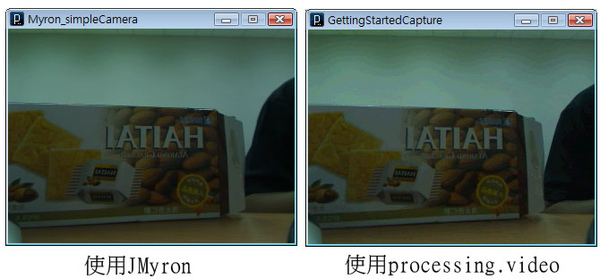
在此之前,就是一個單純的懶= =
一直想說應該有方法可以解決processing.video解析度很差的問題orz
結果到現在終於去使用了JMyron,果然,人還是不能太懶
在一開下去的瞬間,心中滿滿的是感動
